Am vazut ca cineva nu stia cum sa isi faca propriul downloadurl pe un VPS , asa ca m-am gandit sa va fac un tutorial .
*ACEST TUTORIAL FUNCTIONEAZA DOAR PE VPS/DEDICAT CARE RULEAZA LINUX
1.Trebuie sa instalati Apache sau Nginx , eu voi folosi Apache.
Ca sa instalati Apache , va logati in putty si folositi comanda "apt-get install update" iar dupa apt-get install apache2"
Ar trebui sa arate ceva de genul:
Spoiler
2.Dupa ce sa instalat apache2 , intram in fisierul /var/www/html/ folosind comanda "cd /var/www/html"
Ar trebui sa arate ceva de genul:
Spoiler
3.Dupa ce am intrat in folder-ul /var/www/html creem un folder eu o sa il numesc "dwd" , ca sa creeati un folder folositi comanda "mkdir dwd"
Ar trebui sa arate ceva de genul:
Spoiler
4. Acum ne logam in FTP cu datele serverului si mergem in folder-ul /var/www/html/dwd/ Ar trebui sa arate ceva de genul:]
5.Acum adaugam toate fisierele in folder iar dupa setam la server downloadurl-ul .
Exemplu : http://ip/dwd
Cam acesta a fost tutorial-ul daca aveti probleme nu ezitati sa lasati un post reply o sa incerc sa va ajut pe toti .



Am vazut ca cineva nu stia cum sa isi faca propriul downloadurl pe un VPS , asa ca m-am gandit sa va fac un tutorial .
*ACEST TUTORIAL FUNCTIONEAZA DOAR PE VPS/DEDICAT CARE RULEAZA LINUX
1.Trebuie sa instalati Apache sau Nginx , eu voi folosi Apache.
Ca sa instalati Apache , va logati in putty si folositi comanda "apt-get install update" iar dupa apt-get install apache2"
2.Dupa ce sa instalat apache2 , intram in fisierul /var/www/html/ folosind comanda "cd /var/www/html"
3.Dupa ce am intrat in folder-ul /var/www/html creem un folder eu o sa il numesc "dwd" , ca sa creeati un folder folositi comanda "mkdir dwd"
4. Acum ne logam in FTP cu datele serverului si mergem in folder-ul /var/www/html/dwd/ Ar trebui sa arate ceva de genul:]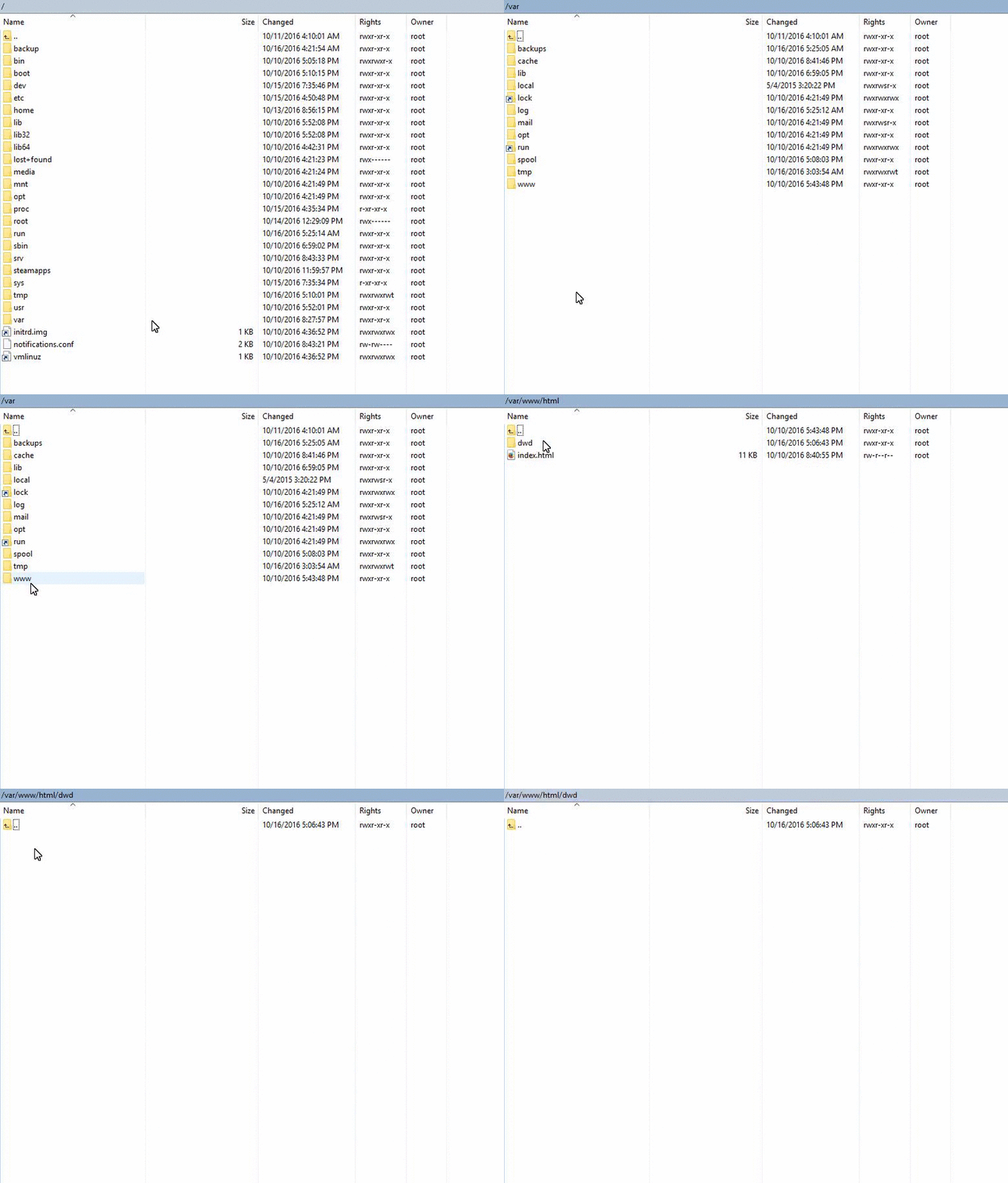
5.Acum adaugam toate fisierele in folder iar dupa setam la server downloadurl-ul .
Exemplu : http://ip/dwd
Cam acesta a fost tutorial-ul daca aveti probleme nu ezitati sa lasati un post reply o sa incerc sa va ajut pe toti .